Guides
Getting started
Start screen: the login screen doubles as the main menu. The centred login panel has the server, account, password and the Play button; small round icons at the bottom left (Settings, How to play, Wiki, Discord; the name shows on hover) and a small TR | EN language switch is at the top right. After login, character select is its own moonlit night scene: the 4 character slots on the left (tap an empty slot to create a new character), a big preview of the selected character in the middle, class info on the right and the Enter game button at the bottom. Settings has graphics quality, screen scale (web and desktop) and battery saver (phones).
Creating an account: from launch (30 November 2026, 20:00 UTC+3) new accounts are created with an e-mail address only: type your e-mail in the Account field of the login screen and a password of at least 6 characters in the Password field; the account is created on first login. Disposable or invalid e-mail addresses are refused and no new account can be created with a username. Existing accounts and pre-registration accounts with a verified e-mail log in as before; pre-registration accounts whose e-mail is not verified are not let in at the first login until they verify it. If you forget your password, open pixelknight.online/hesap and use Forgot password to get a reset link by e-mail; for an account created with an e-mail address the verification link is optional and you can play without verifying (pre-registration accounts verify the e-mail before the first login, see below). If the Remember me box on the login screen is ticked (on by default), your password is not stored on the device; the server gives the device a revocable key instead, and on later launches you can leave the password empty and press Play. Log out, a password change or a ban removes the key; unticking the box deletes the key on the device too.
Creating a character: tap an empty slot to pick your class and gender (Male / Female); the preview doll changes as you choose. Gender is looks only: it gives no stat, skill or any other difference. You also pick a face (5), a hairstyle (5) and a hair colour (6); the Random button shuffles them all. These are looks only too and cannot be changed later for now. Your race also sets the look: Orc characters look like orcs and Human characters look human.
Race balance: low-level characters of the race with fewer recently active players earn extra EXP from hunting and quests (multiplied with other EXP bonuses; EXP only, no gold or items). Which race is under-populated changes automatically with player counts, and the bonus stays off while there are very few players. Current default: 20% more EXP up to level 30. Choosing is free: there is no race lock.
After you create a character you go straight into the game and your first quest is accepted for you. On your first login the game shows a short 4-step "How to play" tour; you can press Skip at any time and reopen the full tour later with Menu › How to play. At levels 1-6 the quest tracker shows a Get quest line; tap it and your character walks to the NPC marked "!". The level 11-21 quest chains (Cedric, Tristan, Dorian) carry you from the meadow to the highlands, and Isaac's quests introduce upgrading, parties, the market, the Hideout and events (level 20) from level 5.
Up to level 15 you lose no EXP when you die; the game reminds you on your first death. The last tour step and the top of the Menu show your next goal (e.g. levels left to Job change).
Touch (phone / tablet)
- Walk: put your finger on the left half of the screen and slide (virtual joystick). With Joystick direction lock on (Settings, off by default), dragging the joystick well past its rim locks your heading: you keep walking after lifting your thumb. Tap the joystick area to unlock; dying, opening a window or starting an auto-walk also unlocks.
- Fight: tap an enemy to target it; the big sword button on the right attacks.
- Skills and potions: the 1-8 buttons around the sword are your skills; potions are in this ring too.
- NPCs: a Talk button appears when you stand next to an NPC (quests, shopping, repair).
- Quests: tap Walk in the quest tracker and your character walks to the objective on its own. An open quest list stays open while you use chat, the menu or other windows; tapping the game world closes it.
- Shop: the gold Shop button at the bottom: premium, diamonds and item offers. Diamonds are earned in game.
- Progression: equip items from the Bag, Character and Skill menus; spend stat and skill points when you level up.
- Stat and skill reset: no NPC needed; the Reset stats button in the Character window and Reset skills in the Skill window reset for gold. They share a 5-minute cooldown, and you must take off all equipment before resetting stats. Not possible in combat (10 s after a fight), in the arena or during events. The first job change happens automatically at level 10 (no NPC or gold needed); mastery at level 60 is still done in town with Kendrick [Master].
- Town, Auto Hunt and Collect: Town returns you to the city; Auto Hunt hunts for you; Collect opens chests by itself.
- Party, clan and PvP: form a party and join a clan from the Menu. In PvP zones the opposing race can attack you.
- Menu: the Menu button opens an icon grid sorted into groups: Hunt (Auto Hunt, its settings, Solo Tower, Shadow Arena, Events), World (Pathfinder, Hideout; return to town is on the bottom bar), Social (Party, Clan, Friends, Market, Mail, Rankings, Invite), Character (Quests, Character select), Help (Assistant, How to play, Newspaper, Support) and System (Settings, Edit interface, Log out). Tap an icon: the menu closes and that screen opens; scroll down if it does not fit. Unread mail shows as a number on the Mail icon.
- Customize the interface: open Menu › Edit interface to drag the quest tracker and the skill buttons on the right wherever you like and resize them with the corner handle or +/-; Save keeps the layout and Reset to default restores the original. A short "Customize the interface" tour shows this on your first logins; reopen it from Menu › Interface tour.
- Skill bar layouts (1-5): tap one of the numbers under the skill bar to load that layout. Once you change the bar, Save becomes active; tap it and the game asks "Save to layout N?" - confirm and the bar is stored in that slot. For an empty layout, arrange the bar and press Save.
Keyboard and mouse (PC / web)
- Walk: WASD or click the ground; hold the left button and the character follows the cursor.
- Fight: left-click an enemy (target and attack); Space / R attacks, Tab / Z selects the next target.
- Skill bar: 1 ... 8 are skills; F1 ... F8 or ` switch pages; Q is the HP potion, G the mana potion.
- Key bindings: change any action's key in Settings > Keys (Esc and Enter are fixed). A key already used by another action is taken from it; "Reset to default" restores all.
- Settings follow your account: Your settings (language, keys, sound...) are saved to your account; they are the same when you log in from another device. The interface layout is per device.
- One session per device: One device plays one account at a time; if another account logs in from that device, the earlier account's session is closed (this is not a ban).
- NPCs and items: E talks to the NPC next to you, F picks up an item on the ground, X sits you down to rest.
- Quests: click Walk in the quest tracker and your character walks to the objective on its own.
- Shop: the gold Shop button at the bottom: premium, diamonds and item offers. Diamonds are earned in game.
- Panels: C character, I bag, K skills, M map; don't forget to spend your stat and skill points.
- Town, Auto Hunt and Collect: T returns to town; the Auto Hunt and Collect buttons sit next to the health bars.
- Chat and PvP: Enter opens chat, Esc closes windows. You can keep walking while chat or a whisper is open (tapping the game world walks). The message box and whisper windows are draggable: grab the ⋮⋮ grip at the left of the message box or anywhere on its tab strip (a short tap works as before, dragging over 6 pixels moves it), or the title bar on a whisper, and move it; the spot is remembered. Links in system messages are clickable. In PvP zones the opposing race can attack.
- Chat rule: posting links, domains or Discord invites is not allowed (except the game's own site and official Discord); the message is not sent. Repeating it within a short time gets you muted for 30 minutes.
- Private message window: drag it by the title bar to move it anywhere (touch too); it remembers its spot. A short tap on the title opens the player menu.
Welcome message: when your first character enters the game you get a private message from "Pixel Knight" (gold, with a [System] badge); links in it are clickable. Only this official message opens links, normal player whispers never do.
Next goal: at the top of the Menu and in Settings right above the Log out button you see a single-sentence goal: a feature that unlocks soon (within 3 levels), an event whose sign-up opens today or tomorrow, a quest ready to turn in, a Hideout harvest, tomorrow's login streak day, or the EXP left to the next level. Tapping the line takes you there when it can (walks to the quest, opens Events or goes to your Hideout).
Bag and Quest bag
The inventory window has two tabs at the top: Bag (60 slots) and Quest (40 slots). Quest items go to the separate Quest tab so they do not fill your main bag; a red dot lights up on the tab when a new quest item arrives. Quest items your active quests need go straight into the Quest bag when the mob dies; no chest tap is needed.
The Needed for quests list under the Quest tab shows the items your active quests ask for, with counts, that are not in the quest bag yet; they appear here even when they sit in your main bag.
Arranging: drag an item in the bag onto another cell: it moves to an empty cell or swaps with a filled one. On a touch screen tap the item, choose Move, then tap the target cell. The Sort button arranges the bag by type, grade (best first), level and name in one tap. The layout is saved per character and follows your account to your other devices; selling, dropping or equipping an item does not shift the others.
Anvil and item upgrading (+1 ... +8)

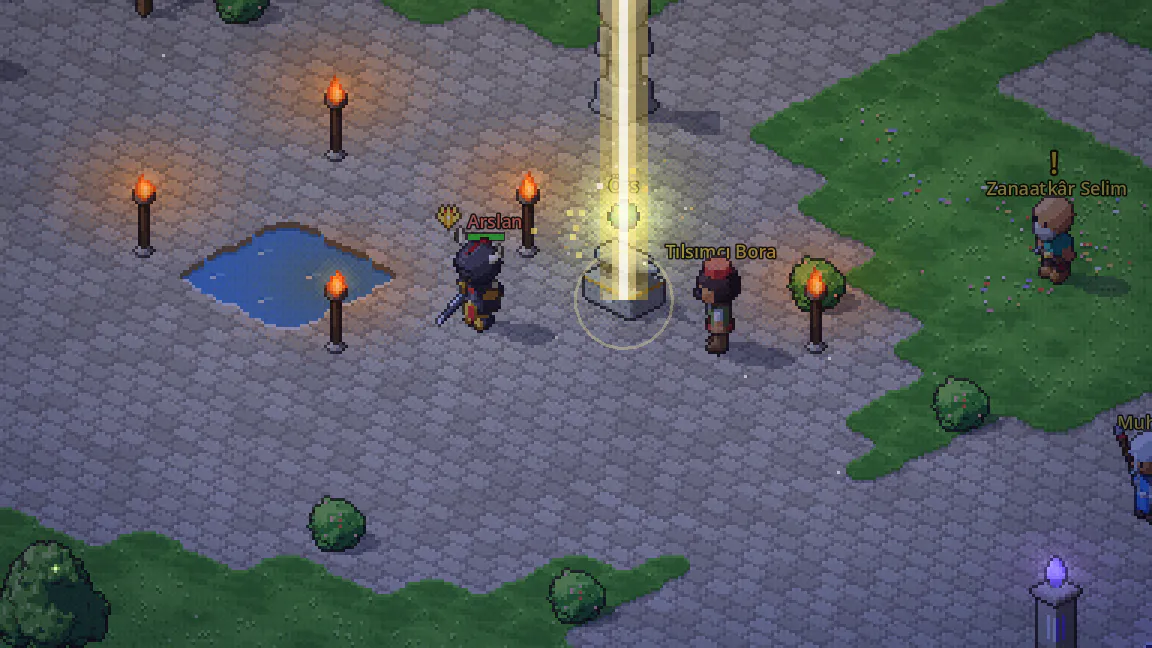
Items are no longer upgraded at an NPC but at the Anvil. The Anvil is a stone anvil with a glowing orb above it: there is one next to the pond in Sarihan Square and one in each race's castle. Walk up to it and press Talk (E on the keyboard) to open the upgrade window.
Items dropped by mobs are always +0; plussed gear only comes from upgrading at the Anvil.
Weapons and armor can be upgraded up to +8 with upgrade scrolls. Each step raises the item's attack/defense; at high steps the item starts to glow on your character. On success a golden light rises from the Anvil, and if the item burns the Anvil glows red. A failed attempt can burn the item or leave it as it was; practice on low steps before trying an expensive item.
Items with their own look: every class has magic weapons with a look of their own (saber, runeblade, flamberge, bearded and crescent axe, glaive, trident, spiked buckler, kris, fang, recurve and bone bow, branch, skull, ring and crystal staff, morning star, warhammer, sun mace, holy shield) and a level 60 magic armor set in its own colors (Obsidra, Vesper, Astraeth, Celestine). Their power matches other items of the same level; the difference is the look, and they glow at +7/+8 too. They drop with a low chance from mobs of level 15 to 60 and more often from zone bosses; the item page shows which mobs drop them.
Auto: the Auto button in the Anvil window opens your bag. Upgradable items are bright; the rest (worn, locked, already at the target) are dimmed. Tap items one by one to pick them (gold border and a check mark), use Select all / None, choose the Target (+1 ... +5) and press Start. The cheapest suitable scroll is used at each step and only the items you picked are upgraded. The window keeps the same size throughout the upgrade.
Scroll types: Low, Middle and High Upgrade Scrolls work up to different maximum steps. The Blessed Upgrade Scroll protects the item on failure. Rarity (normal, magic, rare, unique) affects the success rate. A locked item cannot be upgraded (see item lock).
| Target | Low | Middle | High | Blessed | Gold cost |
|---|---|---|---|---|---|
| +1 | Safe | Safe | Safe | Safe | 0 |
| +2 | Safe | Safe | Safe | Safe | 0 |
| +3 | Risky | Low risk | Low risk | Safe | 0 |
| +4 | Risky | Risky | Low risk | Low risk | 0 |
| +5 | Risky | Risky | Risky | Low risk | 0 |
| +6 | - | Risky | Risky | Low risk | 0 |
| +7 | - | - | Very risky | Risky | 0 |
| +8 | - | - | - | Very risky | 0 |
The risk shown is for normal-rarity items; rarer items carry a higher risk.
Accessory combining
Earrings, necklaces, rings and belts are not upgraded one by one with scrolls; they are combined. At the Anvil, put in 3 of the same accessory (same item, same + level) and 1 Accessory Upgrade Scroll, then press Combine: the 3 accessories become a single +1 accessory.
- Success is 100%, nothing burns; the maximum is +2.
- The first accessory you picked stays (its magic/rare bonuses carry over); the others and the scroll are consumed.
- The Accessory Upgrade Scroll is sold by the Talisman Maker.
- Equipped, locked or rented accessories cannot be combined.
Buff scrolls and Unlimited potions
Resting: after about 6 seconds of neither dealing nor taking damage you start resting: HP and MP refill in about 22 seconds standing, about 9 seconds sitting (X). In combat the normal regeneration applies; there is no resting in event arenas or PvP zones.
Buff scrolls are not sold in the Shop (HP, Defense, Attack, Mana, Speed, Power); they drop in the game or come from events. The exception is the Speed Scroll: buy it for gold from the Provisioner NPCs (colony and Eslant camp) or for Gems in the Shop (packs of 10 and 30). The Shop also sells the Experience Scroll (packs of 10 and 30). Tap a scroll in your bag to use it and gain a timed boost; active scrolls show as icons next to the gold counter. A new scroll of the same kind refreshes the duration (they do not stack); different scrolls and priest buffs work together. Death, changing zones and logging out do not spoil the scroll.
Speed boosts do not stack: while a speed skill (Sprint, Traveler's Step, Featherstep ...) is active, a speed skill of equal or lesser strength is refused with a notice; a stronger one replaces it. The blocked skill button is dimmed. The speed scroll is exempt from this rule and works alongside skills.
| Scroll | Effect |
|---|---|
| HP Scroll | HP +2000, 30 min |
| Defense Scroll | Defense +300, 30 min |
| Attack Scroll | Attack +100, 30 min |
| MP Scroll | MP +1500, 30 min |
| Speed Scroll | Speed +50%, 30 min |
| EXP Scroll | EXP +50%, 1 h |
| Power Scroll | Attack +20%, 30 min |
| Lightning EXP Scroll | EXP +10000%, 4 h |
Unlimited potions are no longer sold in the Shop; owners keep using them. Unlimited HP and Unlimited MP never run out: each use costs a little gold (30-day or permanent). The Unlimited Potion is a powerful single-use potion that restores HP and MP together.
| Potion | Effect |
|---|---|
| Endless HP | HP +800, unlimited, 1,500 gold per use |
| Endless MP | MP +2000, unlimited, 2,000 gold per use |
| Endless Elixir | HP +2000, MP +2000 |
View and graphics settings
All in Menu › Settings, applied instantly without leaving the game.
- View. The world is drawn isometrically at a diagonal angle with depth; houses, castles and trees turn translucent if they cover your character. The minimap and world map are always shown top-down.
- Movement in isometric: W walks up the screen, D walks right on the screen; the joystick also follows screen directions. Zoom with the mouse wheel or + / -.
- Graphics: High / Normal / Low. High (PC and web default): lights and shadows, cloud shadows, sun rays, torch and spell lights, all particles. Normal (phone default): lights, shadows and day/night, but no clouds or sun rays and fewer particles. Low: plain look, least battery use.
- Full screen (web). Toggle it from Menu › Full screen or Settings. To have the game enter full screen on your first click after logging in, turn on the automatic switch in Settings (off by default). Esc exits.
- Battery saver switches graphics to Low automatically.
Day and night
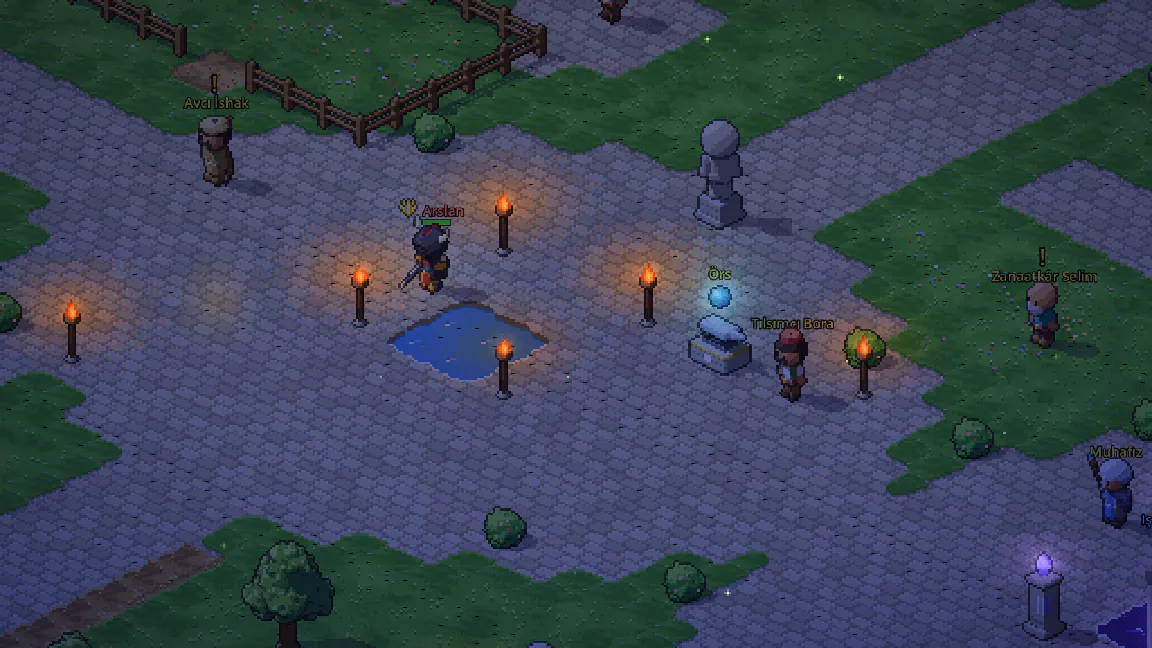
Time flows in the world: a full day lasts about 40 minutes and is the same hour for everyone. In the evening the light turns orange and a blue darkness falls at night; torches, campfires, portals, the Anvil's orb, spells and the glow of +7/+8 items shine in the dark. Day/night is purely visual: mobs and rates do not change. With graphics on Low the night is not shown.
RP and ranks
RP (Race Points) are earned by killing players of the enemy race. Hunting fields are shared by both races and PvP is open only in Crimson Steppe, so RP is earned mainly there and in race wars. As RP accumulates your rank rises (Soldier, Brave, Warrior, Champion, Lord, Warlord); Khan elections and some rewards depend on the RP ranking. Weekly RP trade limit: 100. Staff (GM) characters are not listed in any ranking or rank slot.
Crimson Steppe and PvP rules
- Crimson Steppe requires level 55 to enter and is the only open PvP zone in the game. The reward matches the risk: EXP x1.5, item drops x1.5 and gold x1.5 there. Auto Hunt and Offline Hunt do not work in Crimson Steppe; you hunt by hand only.
- The final steps of the master quest chain need items from Crimson Steppe bosses, so you must enter the zone for them.
- Joining the Race War requires at least level 55.
- Anti-abuse limits: you earn RP for killing the same opponent at most 3 times per day; the revenge bonus is paid once per opponent per day. In the Race War the same victim counts at most 3 times per killer per war, and the winning race's war gold goes only to players who joined the war or are in the war zone. The monthly RP salary needs at least 300 RP and 30 minutes of play that month. In Altar War, if one side leaves entirely the win reward is paid only when the match lasted long enough and the remaining player contributed; otherwise the match is void. Chaos Pit ranking is computed only among players who met the participation requirement. Altar War needs at least 3 players per team; if a side leaves entirely before 120 s the match is void. The Tower first-clear reward is paid once per account, not per character. Items attached to broadcast mail are bound to the character (not tradable).
- Cities and marked safe zones are closed to PvP; the Zones page lists the PvP status of every map.
- In PvP zones you can attack players of the enemy race; killing someone from your own race carries a penalty.
- You take about 8% of the killed player's gold; the dying player loses 10% of their gold.
- PvP damage is about 33% of normal damage.
- You lose experience when you die (5%); there is no loss up to level 15. You get 10 s of protection after respawning.
- Joining the Race War late: you can still join after the war has started, but not while dead or in combat (within a few seconds of dealing or taking damage); revive and get out of the fight first. The same lock applies when you leave the war and walk back in through a gate. Players who signed up during registration are always taken in when the war starts.
- Riftpeak loot: the Rift Warden's loot goes only to members of the winning team who contributed enough (the same bar as the end-of-match reward); a single hit on the boss is not enough. Room and boss loot, like the end-of-match reward, is granted once per account per day, and a second account from the same device / network gets no loot. Each Riftpeak room mob loot slot rolls only once per account per day (no re-roll after a miss), and room loot requires having dealt at least 5% of the total damage to that mob.
- World boss: every Wednesday and Saturday at 21:00 (Turkey time) the Night Fiend appears in Crimson Steppe (a PvP zone, open to all races); an announcement comes 10 minutes before. It vanishes if not slain within 30 minutes. Its strength grows with the number of players taking part. Every account that dealt at least 3% of the total damage gets one personal chest: gold, ores, an upgrade scroll, a gem and, rarely, a Dragon Scale.
Shared hunting grounds
Dunmar Plains, Ravenmoor Wilds, Greymarch Frontier and Mistmount are hunting grounds shared by both races. PvP is off there; you can hunt alongside players of the other race and form cross-race parties. If a party member leaves the field and returns to their own race's territory, the party splits. Castles (Akkartal / Karakurt) stay per race and are not shared.
Loot in the safe fields is lower than in Crimson Steppe: item drops x0.7, gold x0.6. The levelling curve is much faster than before: 1-51 takes a few hours, 51-61 about half a day of play, and 61-70 takes longer.
Party and EXP sharing
Form a party to hunt with friends. Nearby party members share the EXP of a killed mob according to their levels; members with a far higher level are capped so they do not skew the split. For the first 30 s the loot chest belongs only to the side that dealt the most damage (that player and their party); after that anyone can open it. Players of the other race can party only in shared zones without PvP: Sarihan and its surroundings, the starter village, dungeons and the temple. While a party has members of both races and someone enters a PvP zone or a race's lands, the members who are not of the leader's race leave the party. Trading is only possible with players of the same race. Classes with party spells (Priest, Warrior banners) buff the whole party.
Clan
Found a clan or join one through the Clan Clerk NPC. Clan members use a shared chat channel, do clan quests and share clan gains. Clan quests appear in the Quests list under the "Clan" chain.
Clan bank: Any member can deposit gold and items; only the Leader and Officers can withdraw. Officers have a daily limit (day in Turkey time): gold up to 10% of the bank balance at the start of the day and 20 items. The Leader is unlimited. When a member is promoted to Officer or leadership is transferred (new and old leader), withdrawals are locked for that person for 72 hours. If the Leader does not log in for 30 days, the clan is automatically handed to the most senior active Officer (otherwise the most senior active member) and the clan is notified. Every action is written to the clan log.
Market
Open Menu > Market to browse the player market from anywhere: search by item name (as you type, every item whose name matches) or seller name and see who sells what at which price. The "Price" button next to a listing opens that item's price info: market median, lowest and highest price, number of sales, price change and the latest sales (prices are per unit). The "My listings" tab shows your own listings; while in town (a safe zone) you can cancel a listing there and the item returns to your bag. Buying and selling are done only at the Market NPC in town; the menu list shows the hint "Visit the Market to buy".
Gold debt: while you are in gold debt you can't give gold or items via trade, market or clan bank (market purchases included); receiving is allowed.
Offline Hunt and Auto Hunt
- Offline Hunt: Currently off.
- Auto Hunt: While on in the game, your character finds and attacks nearby mobs by itself, drinks potions and picks up items. With the smallest hunting area the character stays in place; with a wider area it roams inside it to look for mobs when none are left, and never leaves the area. While following the party it stays with the leader.
- Premium membership extends Offline Hunt by 4 hours.
Pre-registration and invite rewards
If you pre-registered before the launch, your account gets 14 days of Premium, the exclusive Vanguro skin, the Pioneer title, the never-sold exclusive Dawnfarer costume set (hood + mantle), a 30-day Wolf Pup (Loot Pet) and 1000 Gems by in-game mail at launch. Pre-registration rewards are the same for everyone; there is no gold bonus.
Unverified pre-registration: a verification mail was sent to your pre-registration e-mail before the launch. If you still have not verified it, the game will not let you in at your first login and asks you to verify the e-mail first (check your inbox and spam folder; if you cannot find it, you can resend it at pixelknight.online/hesap). Once you click the link, login opens and the pre-registration gift is delivered to your account once.
Invite 5 active friends with your pre-registration link and you earn the exclusive Herald title: cosmetic only, no stat bonus. An active friend is an account with a verified pre-registration e-mail that joined the game, reached at least level 20 and played at least 120 minutes by hand (Auto Hunt time does not count) spread over at least 3 different days, and does not share a device or network with you or with your other invitees. Inviting your own accounts does not work.
You also earn 500 gems for every active friend you invite (up to 10 friends = 5,000 gems). Activity is checked every Sunday at 23:59 (UTC+3); the gems are added to your account the first time a friend counts as active, and a mail tells you. Each friend is paid only once. These gems are free, not a purchase. Nothing is paid before the official launch (November 30). The invite reward item is bound to the character (not tradable). For Gmail addresses, dots and the + suffix count as the same address: only one pre-registration per mailbox, and the pre-registration gift is claimed once.
Invite rewards are evaluated and given at the end of each week (Sunday 23:59, Turkey time) based on how active the friends you invited are (the team reviews and approves it); the title is given once, you get a mail about it and you wear it from Menu › Titles.
Loot filter
The "Don't pick up items worth less than" option in Menu › Auto Hunt settings › Loot tab skips auto-collecting (Collect, Auto Hunt, Offline Hunt) items whose NPC sell value is below your chosen threshold. Presets: 100, 500, 1,000, 5,000, 10,000 gold. Gold and active quest items are always picked up; you can still tap them in the chest by hand.
Loot Pet: carried in your bag, this companion walks to chests and loots them for you. The Fox has a short range and is slow; the Falcon is faster with a wider range. Collect and Auto Hunt need a Loot Pet in your bag to pick up chests; tapping by hand and "Take all" do not. Sold in the Shop.
Level-gap gold rule
If you are 15 levels or more above the mob, its loot chest holds no gold (items still drop). This rule does not apply in Crimson Steppe; every mob drops gold there. The same level gap applies to the Upgrade Scroll: mobs far below your level do not drop it.
Hideout (Konak)
How to get there: talk to the Hearthstone [Hideout] NPC in the towns (each race's town and the starter village) or press "Go to Hideout" in the menu. You cannot go while in combat or while a monster is targeting you, in or signed up for an event, arena, dungeon or PK zone. When you leave you return to the exact spot you came from. A hideout belongs to a character and is a private 40x40 tile beach plot: sea and sand to the west and south, forest and rocks to the north and east (when you arrive you appear on the jetty or the beach); you can pick one of 3 house looks for free.
NPCs in the hideout: three NPCs stand in the garden (none inside the house): Hearthstone [Garden] right beside the field (seeds, furniture shop and recipes; no trip back to town), Brannoc [Repair] (item repair) and Odalys [Merchant] (buy potions and scrolls, sell items from your bag). The owner and visitors can all use them; just walk up to them. Furniture cannot be placed on the tiles where the NPCs stand.
Garden (8 plots): the garden is a fixed field next to the beach: the 8 plots sit side by side on tilled soil and a crop always grows on its own plot (never somewhere random). No furniture can go on the field, but you can walk through it. Buy seeds from the Hearthstone, plant them on a plot, wait for the timer, harvest. There are "Plant all" and "Harvest all" buttons. Crops never rot; timers run on server time and keep going while you are offline.
| Crop | Seed | Time | Yield |
|---|---|---|---|
| Healing Herb | 40 gold | 2 hours | 2 |
| Mana Flower | 40 gold | 2 hours | 2 |
| Golden Wheat | 60 gold | 4 hours | 3 |
The daily harvest cap is 60 items per character (resets at midnight Turkey time). Garden products and food are bound to your character: no trading, market or dropping.
Recipes (at the Hearthstone NPC): 5 Healing Herbs + 20 gold = a bound Herbal Draught (HP) fitting your level · 5 Mana Flowers + 20 gold = a bound Mana Draught (MP) fitting your level (the tier steps up at levels 1, 20 and 40; draughts cannot be sold or traded) · 5 Golden Wheat = Hideout Bread (30 min, +5% max HP) or Hideout Soup (30 min, +5% max MP). Bread and soup do not stack with each other and work in PvE only: no effect in a PvP zone, event, arena or duel.
Build mode and furniture: buy furniture with gold from the Hearthstone shop (more than 50 kinds, 300 to 25,000 gold; some pieces are garden-only or indoor-only, the cauldron and campfire give light; cosmetic only, no stats). Furniture you buy does not go to your bag: it goes straight to your Hideout storage. In build mode the list at the bottom shows the pieces in your Hideout storage: pick a piece, then tap a tile on the plot: it is placed right there (there is no Place button). Tap a placed piece to select it, tap it again to rotate; use Pick up and tap another tile to move it. Right-click, Esc or Put back lets go of the piece in hand. Furniture turns 4 ways: the Rotate button, the R key, or tapping the selected piece again; nothing is permanent until you press "Save". The plot holds at most 60 pieces; furniture can only go on grass and sand tiles; nothing can stand on the sea, rocks or trees, the path, the jetty, the field, the house or the tile in front of the door. Flat items such as rugs may lie under other pieces. A placed piece leaves your Hideout storage and returns there when you pick it up (not to your bag); if the storage is full you have to make room first.
Hideout storage: hideout furniture no longer sits in your bag; every piece that is not placed waits in the Hideout storage (capacity 240) and takes no bag space. Furniture bought at the shop and the starter gift go straight there. Open the window with the Storage button on the hideout strip or at a Hearthstone (in your garden or in town): the fill level is at the top (e.g. 12 / 240), the pieces below. Tap a piece: Take to bag moves it to your bag (to trade it or list it on the market), Sell sells it at the NPC price (25% of the buy price), Build opens build mode right away. Furniture that lands in your bag (boss trophy, zone decoration, a traded piece) goes into the storage from the bag window: tap the item and choose Put in Hideout storage. Moving pieces to or from your bag works only while you are inside your own hideout; at a town Hearthstone you can only view the list and sell. Bound pieces (padlock mark; e.g. the starter gift) cannot go to your bag or be sold, only placed in your hideout. A piece of furniture bought with Gems becomes bound once it is put in the Hideout storage and cannot go back to your bag; the game asks you to confirm first.
Rare hideout items: 27 rare furniture pieces that no shop sells drop from bosses and monsters: 17 boss trophies (about 10% from world bosses, about 5% from dungeon and raid bosses) and 10 zone decorations (0.19% to 0.3% from regular monsters of a fitting zone). They are not bound: trading and the market are open, they land in your bag; put them in your Hideout storage while in your own hideout to display them, or sell them (1,000 to 10,000 gold to an NPC). Cosmetic only, no stats; they are listed on the item pages.
Privacy: Public (default), Friends + Clan or Closed, plus a "hide from tour" option. The owner can kick or block any visitor (up to 50 accounts); 20 visitors fit at once. A hideout can be visited while its owner is offline.
Visiting: go by name or through the Hideout Tour (Popular and Friends tabs, pages of 10). A visitor can like one hideout once per day (20 likes per account per day), water up to 10 times a day (each watering cuts a growing plot's remaining time by 10%; a hideout accepts 5 waterings a day) and leave one of 8 stamps in the guestbook (1 per hideout per day; no free text; the owner can delete entries). Visits and likes from accounts below level 20 or younger than 3 days do not count. Report an inappropriate hideout with "Report"; when 3 different players report it, it is hidden from the tour automatically.
First-visit tour: The first time you enter your hideout a short, skippable tour opens (garden, build, settings, shop, tour); the first time you visit someone else's hideout a 2-step hint appears. Help in the ... menu of the hideout strip replays it.
Hideout strip: while you are in a hideout a thin one-line bar sits at the top of the screen: the owner's name, the most used buttons (owner: Garden, Build, Storage; visitor: Like, Water), the ... menu with the rest (House, Settings, Guestbook, Report, Help), a red Exit and the – button that collapses the bar. On a narrow screen buttons that do not fit also move into the ... menu. You can drag the bar, its spot is remembered; collapsed it keeps only the title, Exit and +.
Starter gift (test server): the first time you enter your hideout every character gets one big gift pack: seeds of all 3 crops (20 each) plus a wide range of furniture for the garden and the interior (about 40 pieces). The gift pieces are bound to you: they cannot be sold to an NPC, traded, listed on the market or put in the clan bank; place and pick them up in your hideout as you like. Furniture goes straight to your Hideout storage, seeds to your bag; if there is no room the part that fits is given and the rest arrives when you enter your hideout again with space. The pack may be granted again when the server settings change.
House interior and house levels: the house is big (6x5 tiles) and stands in the north of the plot; walk to its door and you pass straight inside (like a map transition, no button); a separate room opens inside (the two rows in front of the door stay free). Leaving through the door or with Leave house puts you back in front of the door; Leave hideout takes you to the place you came from. The interior is a safe zone too and follows the garden's visitor rules (capacity, block, kick). The owner can also set the interior alone to Public, Friends + Clan or Closed ("garden open, house closed"); when the house closes, visitors inside are sent to the garden.
The house has 5 levels: Hut, House, Manor, Keep, Castle. Each level is built from the one before it, in order (no skipping).
| Level | Requirement | Gold | Materials (from your bag) | Build time | Rooms | Interior items (wall) |
|---|---|---|---|---|---|---|
| 1. Hut | - | free | - | - | 1 room, 10x8 | 40 (14) |
| 2. House | Level 20 | 500,000 | 40 Iron Ore, 40 Linen Scrap, 20 Rough Gem | 8 hours | 1 room, 12x9 | 60 (20) |
| 3. Manor | Level 35 | 3,000,000 | 60 Silver Ore, 40 Silk Scrap, 30 Wolf Fang | 1 day | 2 rooms (stairs): 12x9 + 10x8 | 90 (30) |
| 4. Keep | Level 50 + 5 different boss trophies placed in your hideout | 15,000,000 | 30 Skyiron Ore, 60 Polished Gem, 40 Cursed Bone | 2 days | 4 rooms: 14x10, 12x9, 10x8, 10x8 | 160 (60) |
| 5. Castle | Level 60 (or the level cap, if lower) + 8 different boss trophies placed | 40,000,000 | 40 Dragon Scale, 60 Flawless Gem, 50 Skyiron Ore | 4 days | 4 rooms: 14x10, 12x9, 10x8, 10x8 | 200 (72) |
House bonuses: every level gives passive bonuses that work only in your own hideout.
| Level | Garden grow time | Daily harvest cap | Extra crop chance (per plot) | Hideout food duration | Hideout storage |
|---|---|---|---|---|---|
| 1. Hut | - | 60 | - | 30 min | 240 |
| 2. House | -5% | 70 | 5% | 35 min | 280 |
| 3. Manor | -10% | 80 | 10% | 40 min | 320 |
| 4. Keep | -15% | 90 | 15% | 50 min | 360 |
| 5. Castle | -25% | 100 | 20% | 60 min | 400 |
Construction rules: pressing Upgrade spends the gold and the materials at once (materials come out of your bag; Hideout storage, the warehouse, locked and rented items do not count) and construction starts. There is no cancel and no refund, and only one build runs at a time. The timer keeps running while you are offline. During construction you keep using your house and its rooms as they were; scaffolding stands around the house with a bar above it showing the time left, and visitors see it too. The new rooms, item limits and bonuses apply when the build is done. The garden bonus is taken from your level at planting time: crops already in the ground do not speed up when the build finishes. Extra crops count toward the daily harvest cap. The food bonus follows your house level at the moment you eat; Hideout food still works in PvE only.
Existing players: from the old three-level layout a Manor is now level 3 and a Keep level 4; what you paid and your rooms are kept, and you get the new bonuses right away.
The House button (in the ... menu of the hideout strip) shows your house level, its bonuses, the next level's requirements (what you have / what is needed; missing ones in red) and the Upgrade button, or the time left while a build is running. Near the stairs a Go up / Go down button appears, and next to your chest or mailbox a Chest / Mail button (the chest opens the warehouse only if you came to the hideout from a town). The Interior privacy section in Settings chooses who may visit the inside. An upgrade burns the gold and the materials (no refund) and cannot be undone; the boss trophies must be placed in your own hideout (garden or inside; bag, Hideout storage and warehouse do not count) and are not used up. A trophy counted for an upgrade is recorded to that character: it stays tradable, but it never counts again for another character's house upgrade (you can still count it for your next level). Upper rooms are reached by the stairs in the corner of each room; the tiles in front of the door and the stairs stay free of furniture.
Wall and floor items: interior pieces (bed, wardrobe, fireplace, workbench decor; and the wall pieces: chandelier, three paintings, wall trophy mount and curtains) are bought with gold at the Hearthstone shop (12 kinds, 3,500 to 20,000 gold). A wall piece hangs only in a free wall slot (the two back walls are split into slots; curtains and wide paintings take two); a floor piece goes on tiles like in the garden. Boss trophies can both stand on the floor and hang on a wall. The interior item limit is the total over all rooms and grows with the house level. Only the owner edits the layout; the garden and the interior are separate layouts and a piece moves between them through the Hideout storage. When the house tier rises the rooms change shape: pieces that no longer fit (outside the room, in front of the door or stairs) return to your Hideout storage; none is ever lost. If the Hideout storage is full, the pieces that do not fit are put on hold (not visible meanwhile); free some space and enter your hideout again to get them back. The interior is closed to visitors by default.
Storage Chest and Mailbox: next to a Storage Chest placed in the house, and for its owner only, your normal storage opens, the same one the Storage NPC in town opens (there is no second storage); it works in the Cottage too. The Mailbox opens your normal mail. You can place one of each per house; visitors cannot use them. Storage actions stop when you walk away or leave the house.
Old layout: when the plot grew from 24x24 to 40x40, furniture that is invalid in the new layout (on sea, rocks, path, field, house or the door tile) returns to your Hideout storage; none is ever lost. If the Hideout storage is full, the pieces that do not fit are put on hold (not visible meanwhile); free some space and enter your hideout again to get them back.
Safe zone: no combat, damage, duels, PK, trading, dropping, picking up, market stalls or starting Auto Hunt in a hideout. Buying, selling and repairing at the garden NPCs is allowed.
Conquest (strategy)
Open it from Menu > World > Conquest. Every account has a Village (needs a character of level 10 or higher); a village is never lost. Combat is not shown; results arrive in Reports.
Village: the Lumber Camp, Quarry and Iron Mine produce wood, stone and iron (also while offline); Storage sets the stock cap. The Barracks train Spearmen, Swordsmen and Archers, the Stable trains Cavalry and the Banner Workshop trains Banner Bearers. There are no speed-ups.
Units: Spearmen counter cavalry, Swordsmen hold against infantry, Archers are good against infantry and cavalry but weak against archers, Cavalry is fast and hits hard. The Banner Bearer is expensive and is needed to capture a point.
Map: every player's village is shown on the map; villages are placed from the centre of their race's side outwards. Every player of the race holding a Fortress (attack), Outpost (defense), Mine (gold) or Altar (EXP) gets a buff (each buff is capped; buffs do not apply in PvP zones, events or the arena).
Marching: travel time is per tile and an army marches at its slowest unit's speed. The arrival time is shown when you send. You can recall an army during the first half of the trip.
Capture: if the attack wins and a Banner Bearer survives, the point goes to your race and you become its Lord (your name is shown, you earn hourly resources); the Banner Bearer is spent. The same account has to wait between two attacks on the same point.
Defense and joint attacks: you can send support troops to your race's points and withdraw them. Every point has a troop capacity (Fortress 2000, Outpost 1000, Mine and Altar 800; Cavalry takes 4 places); the excess marches home. Attacks of the same race reaching the same point within 60 seconds merge into one battle; the point goes to the attacker whose Banner Bearer survived and who sent the largest army.
Resistance and seasons: a race holding less than 35% of the points gets Resistance (faster production and training). A season lasts 30 days; the race with the most point-hours wins (reward for players who won a battle or held a point as Lord), then the map resets.
Meaningful battles: wins and ranking points count only in meaningful battles: the losing side must have at least 25% of the winner's power and lose at least 10 population. Against accounts on the same device or registered from the same IP, that opponent gives no win, kill or defense credit. Kill credit is spread over the opposing side by power share; opponents bringing under 5% of their side count together as one (if they add up to less than 5% no win is booked, and they give no defense credit). A battle won only against a same-IP opponent gives no win. After the first 3 meaningful battles between the same two accounts in a season, that pair gives no more kill or defense credit (wins are not affected).
Season reward: players of the winning race who contributed (having brought at least 5% of their side's force in the battle, with at least one meaningful win, or at least 2 hours as Lord plus one meaningful defense) get the cosmetic Conquest Champion title and 50,000 gold (by mail, one account per device; accounts registered from the same IP on the same day also count as one). The top 10 by enemy losses inflicted also get Gems: 1st 300, 2nd-3rd 200, 4th-10th 100 Gems. Season reward items that arrive by mail are bound to the character: they cannot be traded, listed on the market or sold to an NPC.
Task Board
Menu > Task Board offers tasks that refresh every day (hunting, dungeons, gathering and more). Finish a task and press Take for its reward; Take all collects every ready task in one tap. The board opens at level 3. Finishing all of the day's tasks opens the daily chest; finishing everything on enough days in a week also earns the weekly chest. The chests open from level 10; below that, tasks give Season XP only. Tasks are picked to suit your level and each one also gives Season XP. The refresh time is shown at the top of the panel (the day follows UTC+3).
Season
Menu > Season (Season XP is earned from level 3, free-track rewards can be claimed from level 10; the paid Season Pass+ track is not bound by this limit): over the several weeks of a season you earn Season XP by playing and finishing Task Board tasks; XP unlocks levels and every level has a free reward (gold, potions, scrolls, a title, pet or costume). The XP you can earn from regular play per day is capped. Press Take to collect a reward; unclaimed rewards are lost when the season ends and progress starts over in the next season.
The paid Season Pass+ unlocks an extra cosmetic reward track (bought in the mobile app); it sells no power, only looks and collection rewards.
Pets
Menu > Pets: a collection of small companions that follow you around. Pets are cosmetic only and give no power. Sources: boss and dungeon drops (pet tokens), events, season rewards and Codex page rewards. Using a pet token adds the pet to your collection; loot pets (dropped as items) still count towards the collection. Pick one you own with Set active, put it away with Abandon. Some pets fly; the card of a pet you do not own yet tells you where it comes from.
Stat guide
There are five stats: STR (melee attack), HP (health; for Warrior and Archer/Assassin also the energy pool), DEX (bow attack, hit rate and evasion), INT (Mage attack; mana pool for Mage and Priest) and MP (spell damage). You get 3 stat points per level (5 per level above level 60), plus 10 extra when creating a character. A stat can reach at most 255.
| Class | Main stat | Secondary | Note |
|---|---|---|---|
| Warrior | STR | HP | A little DEX raises hit rate and evasion. |
| Archer/Assassin | DEX | HP | Both bow and dagger hit with DEX. HP also grows the energy pool. |
| Mage | MP | INT | Spells hit with MP. INT grows the mana pool and boosts the basic attack; it is also needed for INT-gated gear. |
| Priest | HP + INT | STR or MP | Healing does not depend on stats (a fixed amount or a percentage of the target's health). Put INT in for mana and HP for survival; for damage add STR (melee) or MP (spells). |
- Gear requirements first: put in just enough to wear the item you want (its STR, INT, DEX, HP or MP requirement), then put the rest into your main stat. Requirements are shown on the item page.
- Reset: the Reset button in the Character window header (no NPC needed; take off all equipment first). It costs gold only and rises fast with level: about 112k at level 20, 1.1M at 30, 4.4M at 45, 17.6M at 60. So spend points carefully early on.
- If unsure, you can keep points unspent; unspent points are never lost.
Codex
Menu > Codex has Creatures, Pets, Costumes and Titles pages. An entry is marked once you have defeated a creature enough times, own a pet or costume, or have earned a title. When a page reaches the number of entries it needs, press Take for the page reward (one time only).
Showcase
In the rankings (Menu > Rankings) tap a row to open that player's showcase card. The inspect window now shows the player's full look (costume, wings, pet and title).
Comeback reward
A player who returns after being away for 3 days or more receives a welcome-back gift by mail (gold and basic consumables; the longer you were away the bigger the package: 3, 7 and 30+ days; the 30+ day package needs an account at least 60 days old with a character of level 30 or higher, otherwise you get the package below it). The items are bound and cannot be traded. It is given once per account every 30 days and a notice reminds you on login; collect the gift from your mailbox.
New wings and costumes
The new wings and costumes are purely cosmetic and give no power. They come from bosses, events and the shop; wear what you own from the look tab of the Character window and track them in the Costumes page of the Codex.
Launch event
1.5x EXP for the first 7 days: from 30 November 2026 20:00 (launch) to 7 December 2026 20:00 (Turkey time, UTC+3) the EXP you earn from creatures and dungeons is multiplied by 1.5. The bonus stacks with Premium, scrolls and other EXP bonuses. Auto Hunt gets 1.5x EXP too; Offline Hunt does not. When you log in, a notice reminds you of the event and its end date.
First Hundred title: the first 100 characters on the server to reach level 30 earn the permanent First Hundred title (cosmetic; wear it from Menu › Titles; it is different from the pre-registration Pioneer title). The slots are server-wide and fill in order. Only one character per account and one account per registration device can take it; staff accounts do not count.
Open test panel
During the open test you can open the in-game Proving Grounds window (menu / top-right button) and boost your character to try the game: jump to level 65 (going from 65 to 70 is up to you), take any item with any plus level and count (upgrade scrolls included), get a full 8-piece set for your class, and send yourself up to 50,000 gems per account in total.
While the panel is open, stat and skill resets are free (0 gold); for a stat reset you still need to take off all your gear first.
The panel closes on 30 November 2026 at 19:00 (Turkey time, UTC+3) and all test progress (characters, items, gems) is wiped at launch.
Controls (web)
| Key | Action |
|---|---|
| WASD | Move |
| Left click | Click the ground: walk there (hold: follow the cursor) · click an enemy: attack · NPC / friendly player: select |
| Tab / Z | Next target |
| Space | Attack |
| R | Auto attack |
| 1 ... 8 | Skills on the skill bar |
| ` | Switch skill bar page |
| F1 ... F8 | Go to skill bar pages |
| Q / G | HP / mana potion |
| E | Talk to the NPC next to you |
| F | Pick up the item on the ground |
| X | Sit / stand (regeneration is higher while sitting) |
| T | Return to town |
| C I K M | Character, inventory, skill and map panels |
| Mouse wheel / + - | Zoom in / out |
| Enter | Chat |
| Esc | Close the open panel |